
Keep Bundata login, organization AI provider keys, workspace model choices, embedding profiles, vector storage, source secrets, and agent credentials separate.
Models and credentials
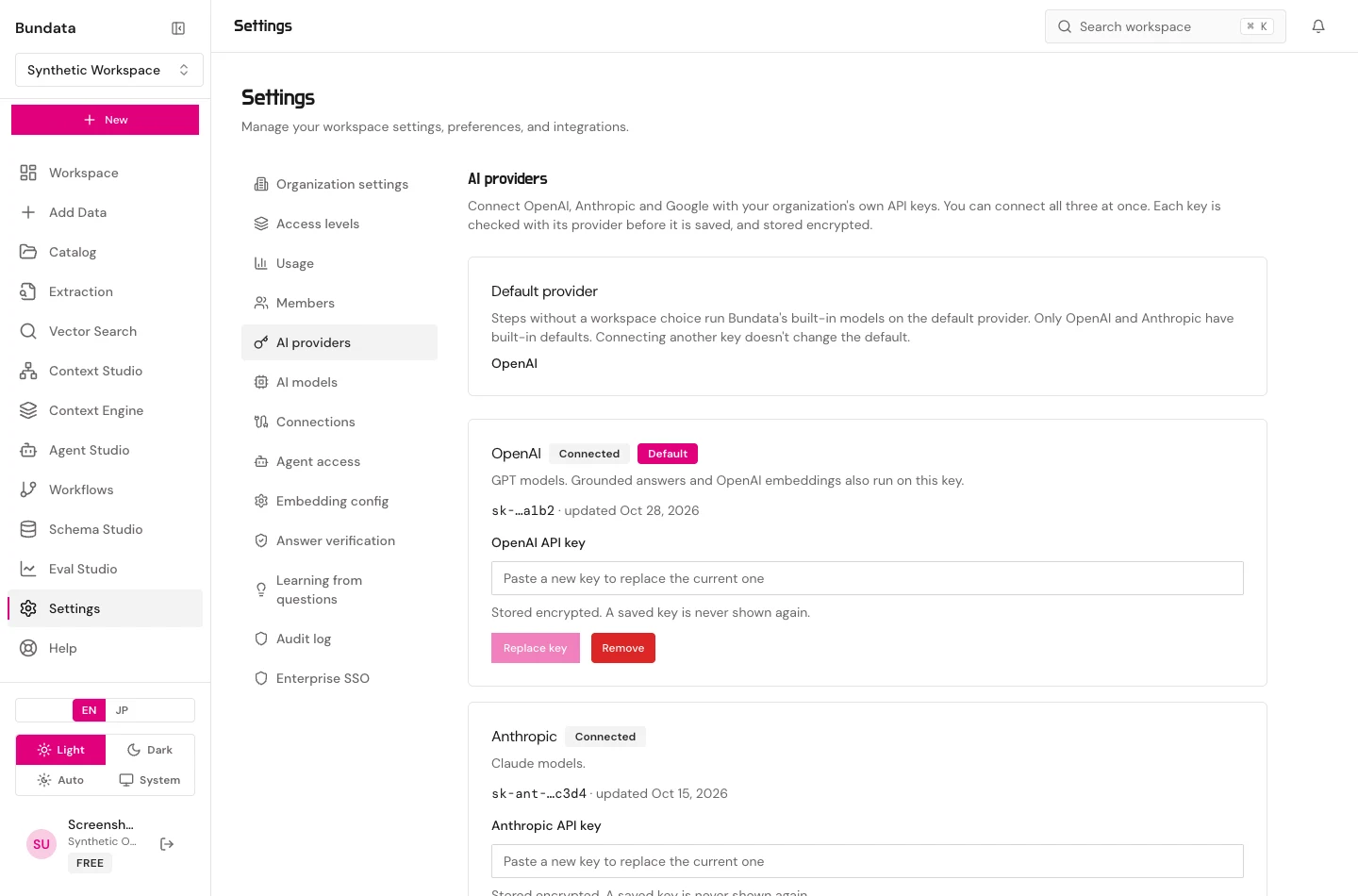
Settings → AI providers (?tab=api-key) stores organization-owned API keys for OpenAI, Anthropic, and Google (Gemini API key from Google AI Studio). Settings → AI models (?tab=ai-models) configures which model serves each AI step in the workspace. Neither is a Bundata login. Never send a provider key or an agent token to Bundata support, and never paste one into documentation or a ticket.
Decision table
| Credential | Required for | Who provides it | Notes |
|---|---|---|---|
| Bundata login | Every signed-in action | Client account, granted by an administrator | Browser cookie bundata_session, or a JWT only for an explicit non-browser login |
Organization AI provider keys (OpenAI, Anthropic, Google) | Generation, analysis, routing, judging, and provider-backed embeddings | Client owner or admin in Settings → AI providers | All three can be connected at once. Default provider is OpenAI or Anthropic |
OpenAI embedding text-embedding-3-large | Embedding and semantic search when the collection profile is OpenAI, 3,072 dimensions (halfvec) | Organization OpenAI key (query embeddings on existing OpenAI-indexed collections can fall back to the deployment key when configured) | Input variant is current |
Google embedding gemini-embedding-001 | Embedding and semantic search when the collection profile is Google, 3,072 dimensions (halfvec) | Organization Google key | Offered when a Google key is connected; truncates inputs at 2,048 tokens (2,016 UTF-8 bytes) |
Local google/embeddinggemma-300m | Embedding when that profile is selected, 768 dimensions | Customer-operated sidecar URL that the API can reach | Input variant is current_text_first_full. Selecting it does not start a sidecar |
Voyage voyage-context-4 | Embedding when that profile is selected, 1,024 dimensions | Operator-configured Voyage credential on the API (MONGODB_API_KEY) | Not entered in Settings → AI providers |
Scoped agent credential (bdk_…) | Non-browser calls to /api/agent/v1/* and the workspace MCP server (/api/agent/v1/mcp) | Workspace owner or admin in Settings → Agent access | Shown once at creation; acts with the creator’s live workspace permissions |
| Vector storage | Search over stored embeddings | Operator, or a destination you configure separately | Changing the workspace default does not rebuild an existing collection |
| Source or destination secret | That connection only | Client administrator, least privilege | Stored as connection secrets. A read probe is not write permission |
Organization AI providers
An organization can connect OpenAI, Anthropic, and Google keys at the same time in Settings → AI providers:
- Sign in as owner or admin and open Settings → AI providers (
/platform/settings?tab=api-key). - Connect a key for OpenAI, Anthropic, or Google (
PUT /api/account/org/llm/providers/:provider). - Bundata verifies the key with the provider before saving it. A rejected key fails with
AI_PROVIDER_KEY_REJECTED; if the provider cannot be reached, nothing is saved (AI_PROVIDER_UNREACHABLE). - Each key is stored encrypted (
AES-256-GCM) inorganization_llm_keys. Reads show only a masked placeholder, key version, and update time. - Default provider: OpenAI or Anthropic serves Bundata’s built-in defaults for steps without an explicit choice (
PUT /api/account/org/llm/default-provider). Connecting a second or third provider never changes the current default provider. - Removing a key: Before removing a key (
DELETE /api/account/org/llm/providers/:provider), the screen warns how many workspace choices depend on it. Dependent choices are then refused when they run (AI_PROVIDER_NOT_CONNECTED), never silently swapped to another provider.
Workspace AI model map (Settings → AI models)
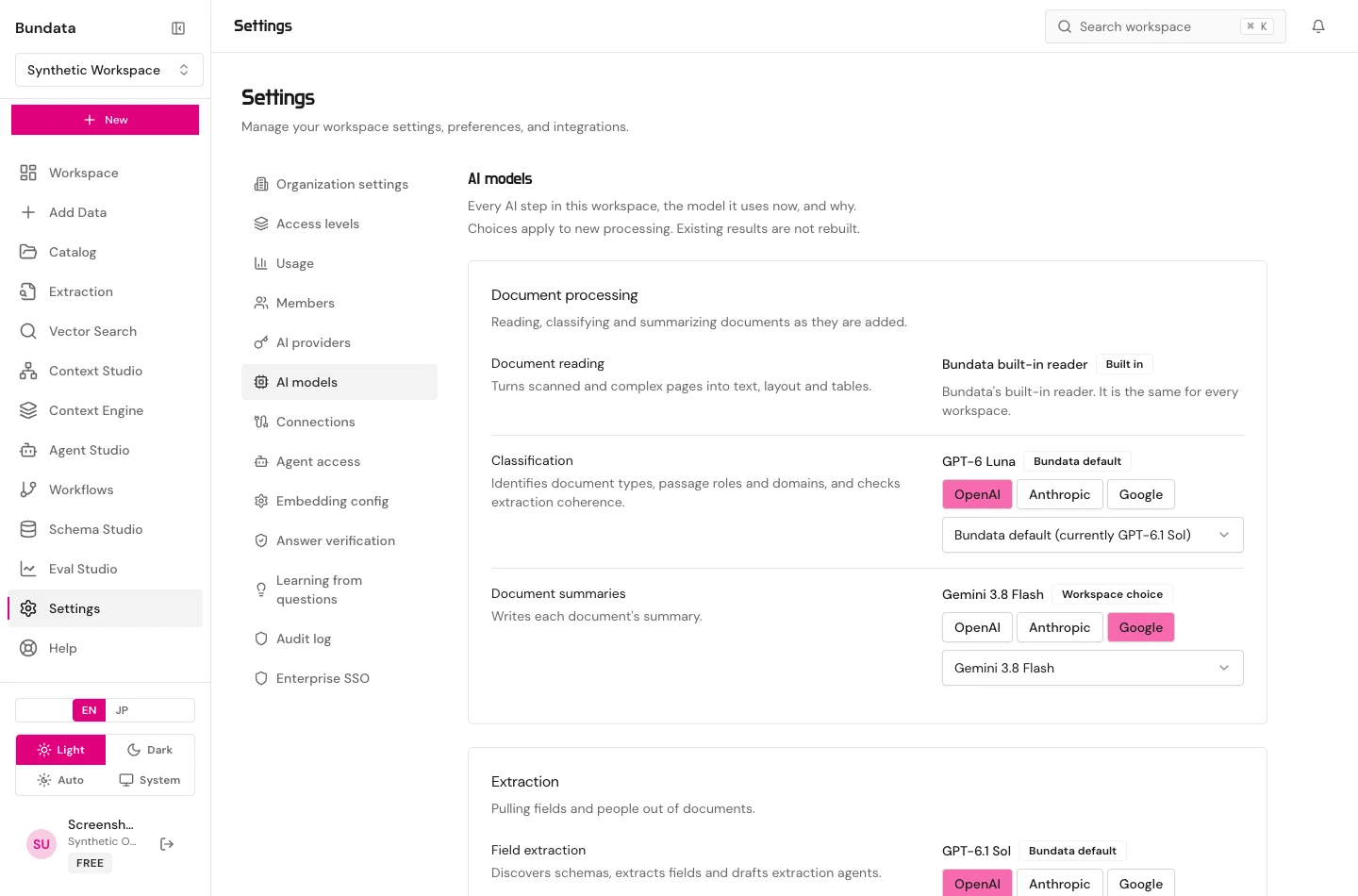
Models are resolved in four levels, from most specific to least specific:
- Per-item choice: set on a collection search policy, an extraction agent or discovery run, an Eval Studio run (
judgeModel,answeringModel), or a workflow AI node. - Workspace choice: set by a workspace admin in Settings → AI models (
/platform/settings?tab=ai-models,PUT /api/w/:wsId/ai-models/choices/:step). - Organization default provider: Bundata’s routing policy on the organization’s default provider.
- Deployment setting: operator environment variables, Amazon Bedrock, the GPU inference plane, or a customer-owned installation (
MODELS_MANAGED_BY_INSTALLATION).
Every choice is honored or refused, never swapped. If a chosen model’s provider is disconnected or unapproved for the workspace data policy, the call fails with a structured code (MODEL_NOT_IN_CATALOG, AI_PROVIDER_NOT_CONNECTED, MODEL_NOT_APPROVED, MODEL_CHOICE_UNAVAILABLE).
- Google-only organizations: Because Google cannot be the default provider, an organization with only a Google key can click Fill with Gemini (
POST /api/w/:wsId/ai-models/fill-gemini) to assigngemini-3.5-flash-liteto fast steps andgemini-3.8-flashto standard steps. - Choosing between Google and Amazon Bedrock: On deployments where Amazon Bedrock is enabled, Bedrock serves as the chat default for steps with no workspace choice, or admins can switch the workspace chat backend between Amazon Bedrock and connected API providers such as Google (
chatBackend). A workspace choice in Settings → AI models runs on the provider it names. Per-item choices on extraction agents or discovery are refused when Bedrock serves chat (MODEL_CHOICE_BEDROCK,bedrock_serves_chat) rather than silently moved to Bedrock.
Embedding profiles
Settings → Embedding config (/platform/settings?tab=embedding) offers up to four workspace embedding profiles:
| Profile | Dimensions | Prerequisite |
|---|---|---|
OpenAI text-embedding-3-large | 3,072 (halfvec) | Organization OpenAI key (search queries on existing OpenAI-indexed collections can use the deployment OpenAI key when no org key is connected) |
Google gemini-embedding-001 | 3,072 (halfvec) | Organization Google key. Uses RETRIEVAL_DOCUMENT for indexing and RETRIEVAL_QUERY for search; inputs are cut to 2,016 UTF-8 bytes (2,048 tokens) |
Local google/embeddinggemma-300m | 768 (vector) | Reachable sidecar base URL (http or https) saved with the workspace setting |
MongoDB Voyage voyage-context-4 | 1,024 (vector) | Operator Voyage credential (MONGODB_API_KEY) on the API |
A collection stays pinned to the embedding profile it was created with. Changing the workspace default applies to new collections and requires an explicit reindex for existing ones. Workflow Vector Index Update and Search Collection Sync nodes also accept google (gemini-embedding-001 at 3,072 dimensions) alongside openai, local_embeddinggemma, and mongodb_voyage.
Binding an external vector destination (Qdrant, Pinecone, or Weaviate) records which model you attest the target already uses (targetAlreadyUsesModel: true). It is an attestation, not a live health check.
Scoped agent credentials (Settings → Agent access)
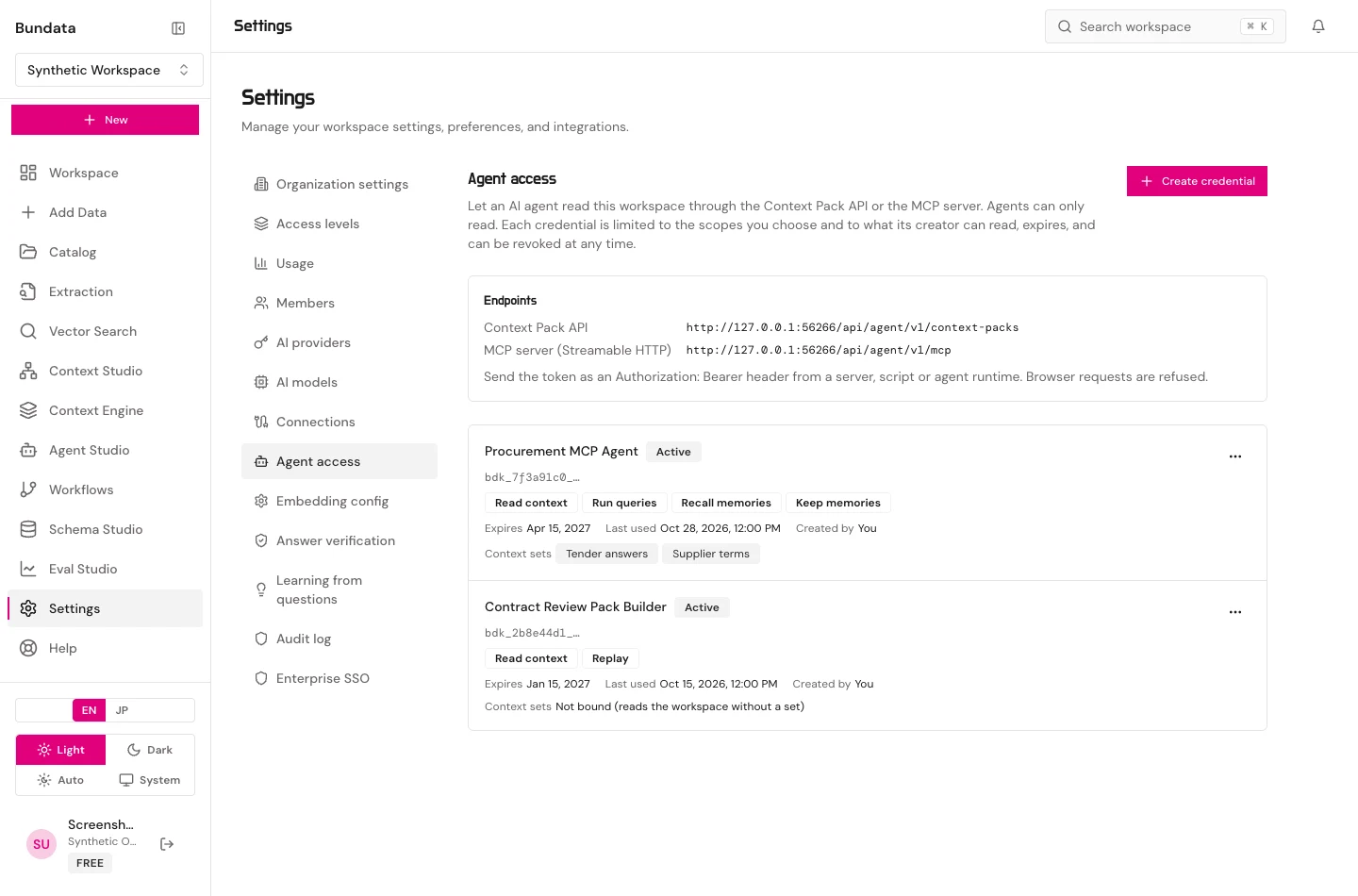
Workspace owners and admins create non-browser tokens (bdk_<16 hex>_<43 base64url>) in Settings → Agent access (/platform/settings?tab=agent-access) for the Agent Context API and Workspace MCP server:
- Scopes are
context:read,queries:run,replay:run,gaps:report,memory:read, andmemory:write. - Each credential expires in 1 to 365 days, can be rotated by its creator or revoked by any admin, and can be bound to up to 10 active Context sets.
- Agent credentials are refused in non-retaining workspaces and cannot be used from browser origins (
AGENT_BROWSER_REQUEST_REFUSED).
What not to put in a ticket
Send the workspace id, collection id, request or run id, and error code. Do not send provider keys, agent bdk_… tokens, connection passwords, document text, or session cookies.