
See how far each knowledge layer covers your documents, build missing layers within a cost budget, and switch on advanced answer paths only when evaluation proves lift.
Context Engine overview
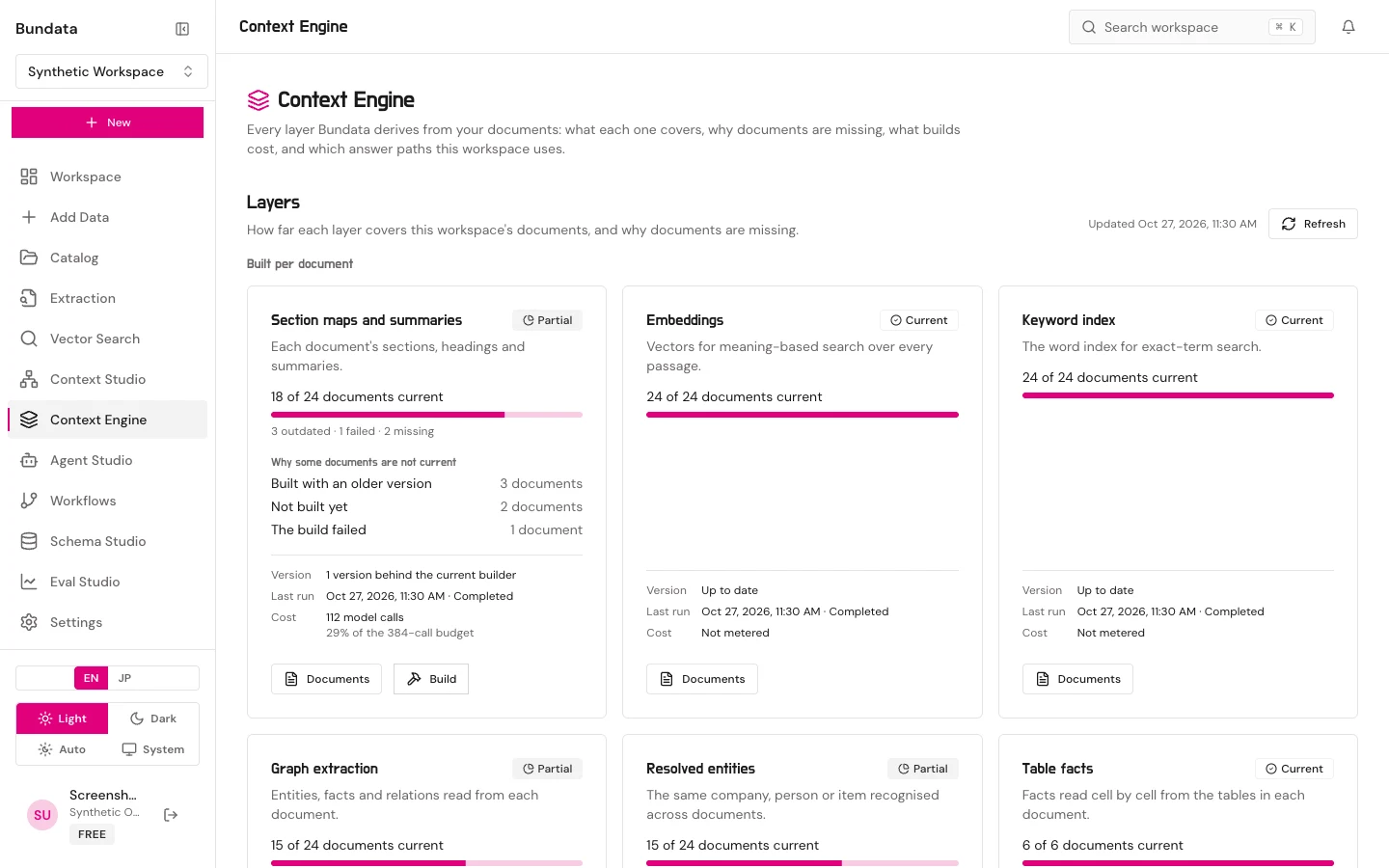
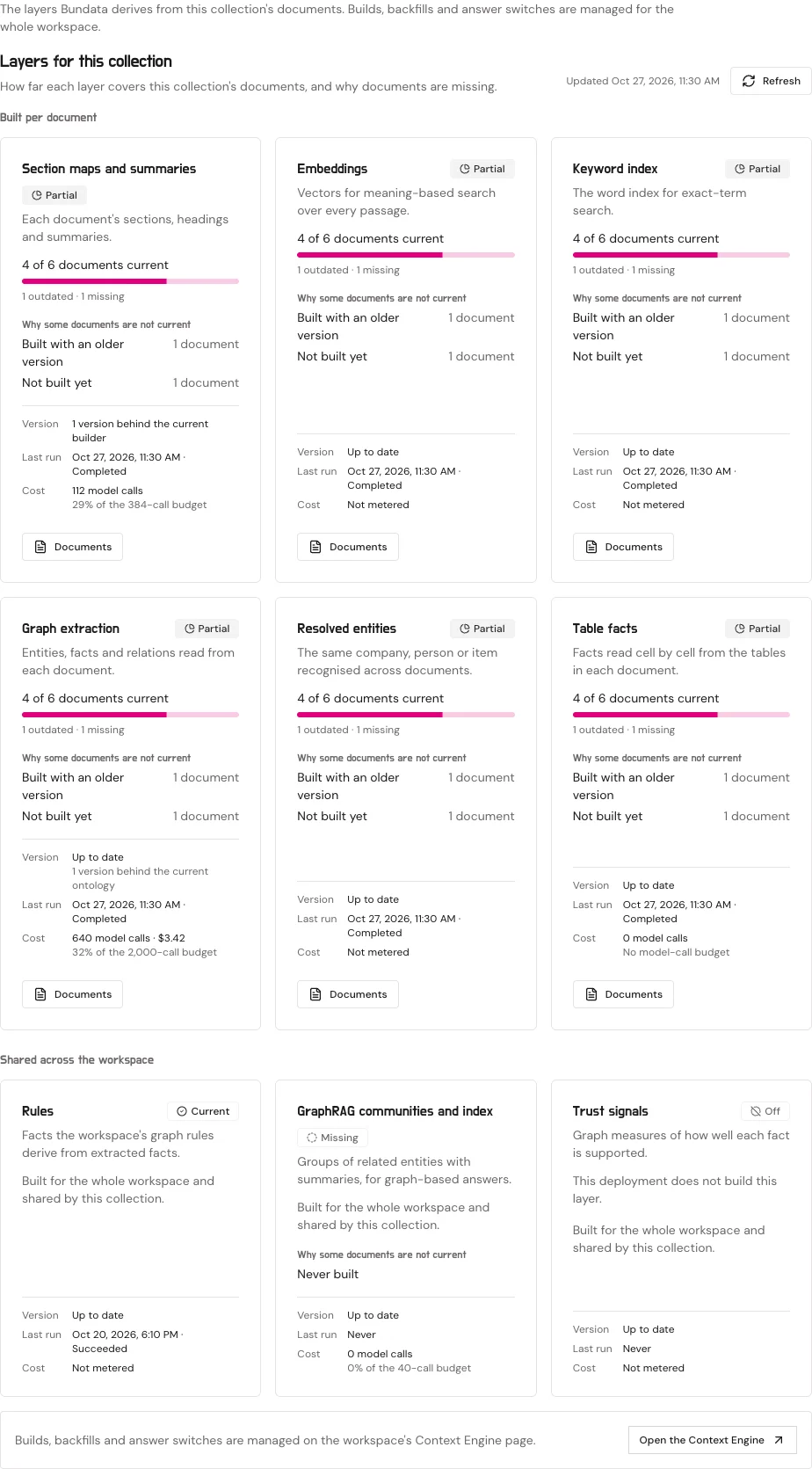
Bundata derives nine knowledge layers from a stored workspace’s documents. Context Engine (/platform/context-engine) covers the whole workspace, while a collection’s Knowledge tab (/platform/catalog/collections/:id?tab=knowledge) scopes the same view to that collection. Reading requires collection:read and document:read; starting builds or changing switches requires context_engine:manage (owner or admin). Non-retaining workspaces are refused with 403 NON_RETAINING_WORKSPACE.
The nine layers
| Layer | Scope | What it builds |
|---|---|---|
Section maps and summaries (topology) | Per document | Overlapping page windows, section hierarchy, structural cross-references, and window/section/document/collection summaries (document-topology/6) |
Embeddings (embeddings) | Per document | Dense vectors (pgvector vector / halfvec) for meaning-based passage retrieval |
Keyword index (lexical) | Per document | Hebrew- and English-aware BM25 postings for exact-term retrieval |
Graph extraction (extraction) | Per document | Entities, temporal facts, and relations extracted from each document’s windows |
Resolved entities (resolution) | Per document | Canonical entities matched and deduplicated across documents |
Table facts (tables) | Per document | Reconstructed logical tables (tables-v3), typed cell values, and finance reconciliation checks |
Rules (rules) | Workspace | Derived facts computed by vetted temporal-graph rule packs |
GraphRAG communities and index (graphrag) | Workspace | Hierarchical entity communities and summaries for graph-backed answers |
Trust signals (analytics) | Workspace | Graph support measures and reviewer decision feedback per fact and document |
Each document is current, outdated, failed, missing, or not applicable, with a durable reason code stored in context_engine_document_reasons (such as not_built, builder_updated, ontology_updated, map_changed, stored_text_reversed, waiting_for_topology, budget_exhausted, or build_error).
Dry run, build, resume, and workflow knowledge layers
Owners and admins can build topology, extraction, resolution, tables, graphrag, and analytics (embeddings, lexical, and rules are maintained by ingestion and search):
- Dry run (
POST /api/w/:wsId/context-engine/builds/dry-run): Previews how many documents will be built (up to 500 per document build), skipped documents by reason, and estimated model calls and USD cost before queueing any job. - Start, Resume, and Cancel (
POST /builds,POST /builds/:id/resume,POST /builds/:id/cancel): Queues the layer’s jobs, resumes capped or failed builds for remaining documents, or withdraws queued per-document jobs. - Knowledge layers from workflow runs: A workflow’s Extract & Embed step includes an opt-in Knowledge layers setting (
knowledgeLayers: { version: 1, enabled, capUsd }from$0.01to$10,000). When enabled, each workflow run builds section maps, table facts, graph extraction, incremental entity resolution, and (when in use) GraphRAG refresh for the documents that run brought in, stopping automatically if recorded spend reachescapUsd(stopped_at_cap).
Answer paths and verification strictness
Advanced answer paths are controlled by three inputs: the deployment Ceiling, the deployment Default, and the Workspace choice (PUT /api/w/:wsId/context-engine/switches/:key).
| Switch | What it enables |
|---|---|
graphrag.local, graphrag.multi_hop, graphrag.temporal, graphrag.global | GraphRAG evidence in collection answers and workspace search |
whole_document | Whole-document execution in agent context packs, Context Explore, and Context Studio |
field_answers | Answering list, count, rank, filter, and compare questions from studied field values (field_answers_v1) |
Switching a path on requires evidence: A workspace can always switch a path off. To switch an opt-in path on, either the path must be a deployment default or the workspace must have a passing Eval Studio memory evaluation (at least 10 decided memory cases where the 95% Newcombe hybrid score interval for pass-rate lift over the matched baseline has a lower bound above zero, using thresholds set before answering). Otherwise the API refuses with EVALUATION_REQUIRED or SWITCH_ABOVE_DEPLOYMENT_CEILING.
Verification strictness (PUT /api/w/:wsId/context-engine/strictness) sets how answers handle claims that cited passages do not support: remove, caveat (default), or abstain.
Ranking profile
The Ranking profile section (GET /api/w/:wsId/context-engine/ranking) shows which named profile (such as bundata-rank-v2@1) ranks the workspace’s retrieval and why (kill switch, workspace assignment, staged rollout ring, or deployment default), along with promotion-gate verdicts. Admins can choose Keep the deployment default (PUT /ranking/assignment) or Follow the rollout (DELETE /ranking/assignment), and workspace owners (learning:manage) can opt into or out of shadow comparisons (PUT /ranking/shadow).