
RAG Chat retrieves from one collection, writes a cited answer, and stores the result.
RAG chat
RAG Chat (JA) answers a question from one collection. The answer has to cite the Smart Bites it retrieved. An answer with no citation is a failed answer.
What this workflow does
The compiled graph is three stages:
- Retrieve catalog context searches the collection you bind.
- Grounded answer writes the answer from those bites and must cite them.
- Store result keeps that answer.
The question is not typed on the canvas. The retrieve step’s query is {{query}}, and you supply the question when you run.
Before you start
You need a stored workspace and one indexed collection that already uses a single embedding profile. Do not change that profile to make an older index match a new model. If the collection is not indexed yet, follow Index a collection first.
You also need an answer schema. The dialog accepts a schema whose shape is an answer string plus a citations array of smartBiteId and documentId. Other shapes are rejected. Create that schema in Schema Studio if the list does not already have one.
Bind the collection
- Open Workflows, then Browse templates.
- Open RAG Chat (JA).
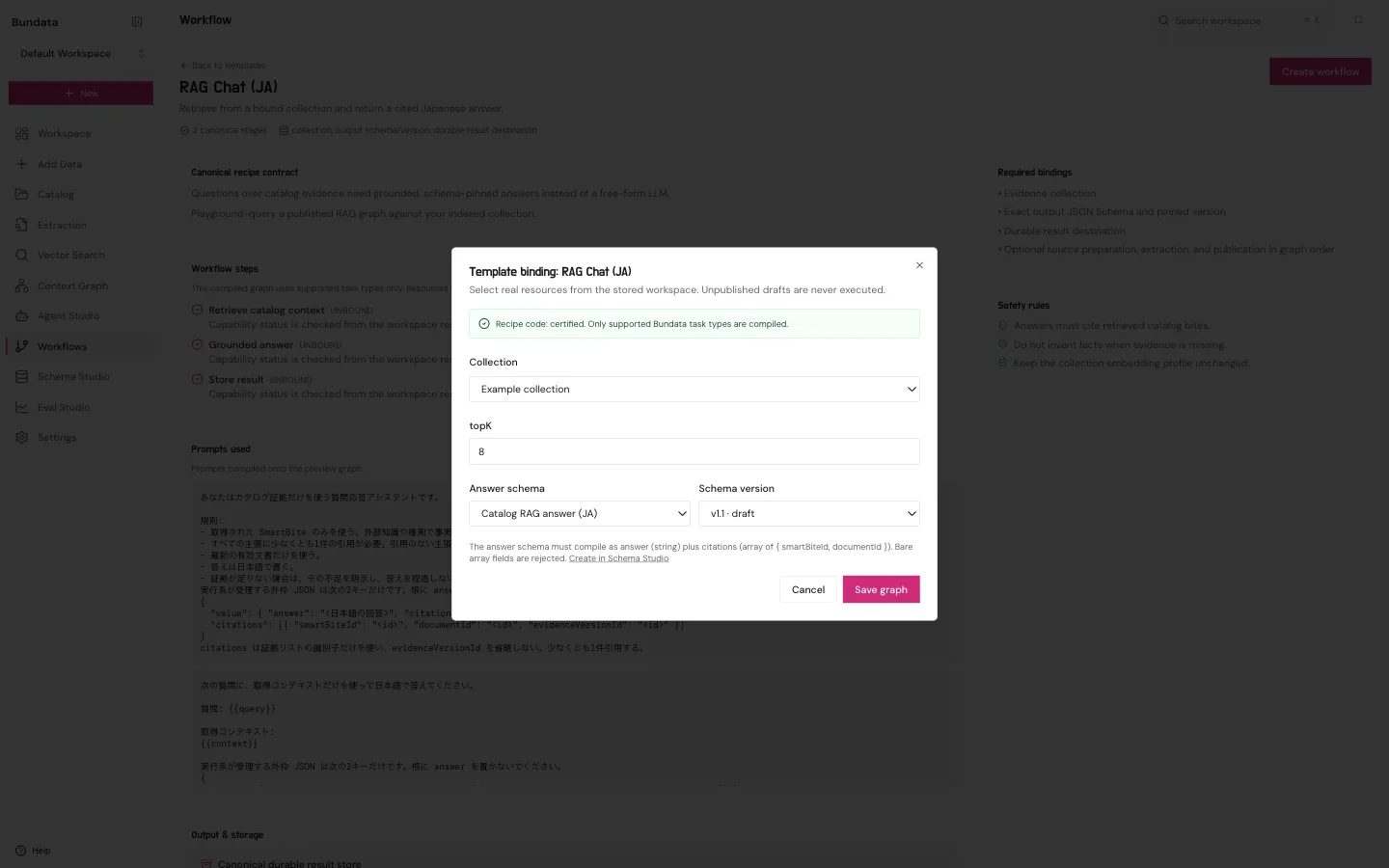
- Click Create workflow. Template binding opens.
- Choose the collection.
- Leave topK at 8 unless you want a different number of bites. The retrieve step later allows 1 to 24.
- Choose the answer schema and a schema version.
- Click Save graph.
Read the canvas
Save graph opens the Tasks canvas. The three nodes are already connected.
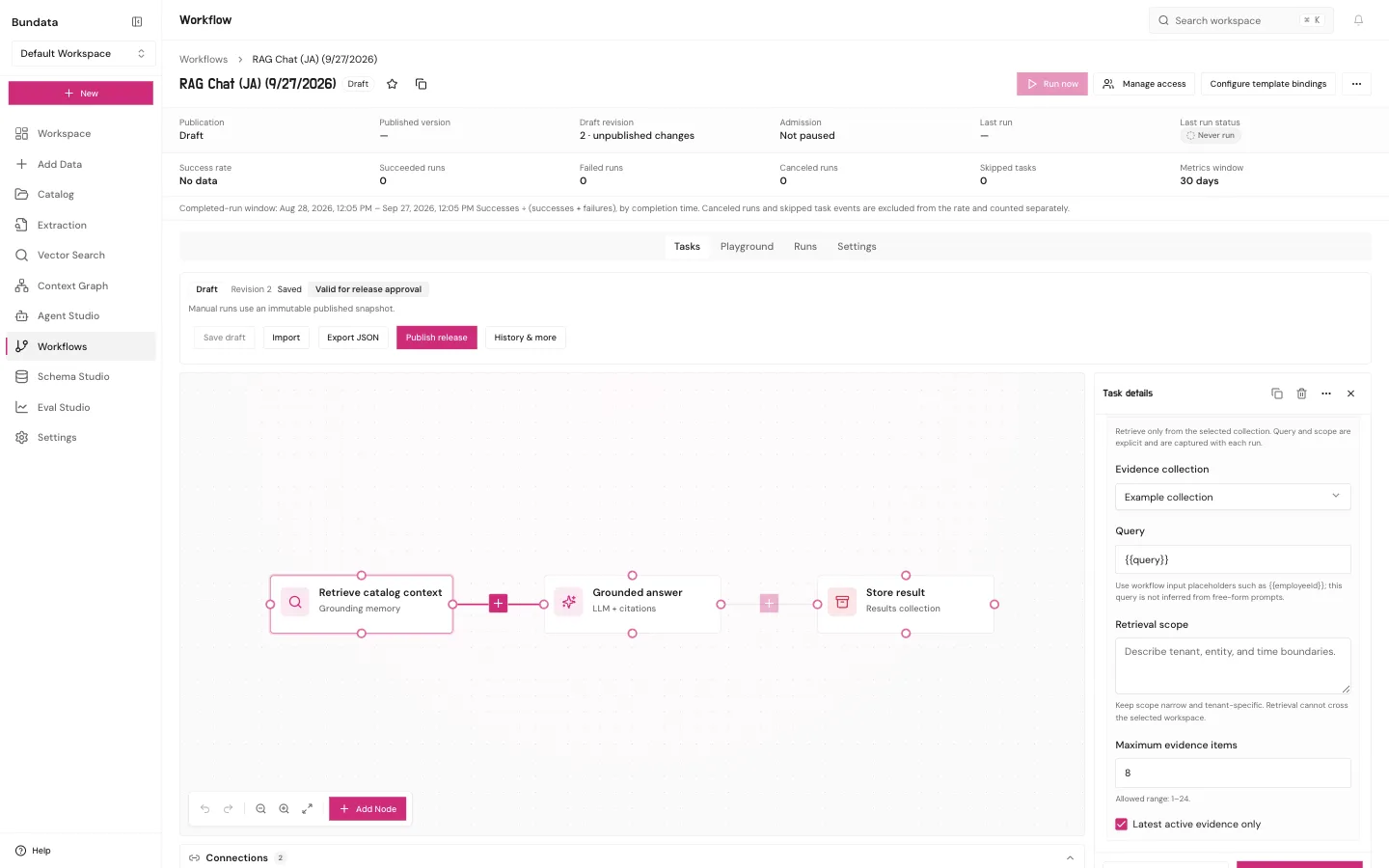
Click Retrieve catalog context and check Task details:
- Evidence collection is the collection you chose.
- Query stays
{{query}}. That placeholder is filled from the question you type at run time. - Retrieval scope is required and starts empty. Type the boundary for this search, such as the tenant or the set of documents this workflow may use. A saved step with that field empty fails when a run reaches it.
- Maximum evidence items matches topK. Latest active evidence only stays on unless you have a reason to turn it off.
Click Apply to draft after you fill the scope. On Grounded answer, you can also choose a model from OpenAI, Anthropic, or Google (or leave Workspace default, which resolves and pins the workspace’s grounded-answer choice when each run is admitted). Apply to draft updates the picture. It does not run the workflow.
Publish and run
Run now stays unavailable while the workflow is only a draft.
- Click Publish release.
- Open Playground.
- Type the question. The field asks for a question over the bound collection.
- Click Run.
Playground runs the published release. If you change the canvas after publishing, Playground still uses the published release until you publish again.
You can also click Run now on the workflow header after the release exists. Last run status is the record of that run. A canvas with no validation issues is still not a succeeded run.
Where to read the answer
Playground lists the run under Recent runs, including whether the answer is grounded and whether it has citations. The Runs tab has the same run. An answer that does not cite the retrieved bites is not a result to copy into a ticket.