
Explore pairs a bounded tool-using chat turn with a live canvas and publishes curated focus items into a context set.
Overview and Explore
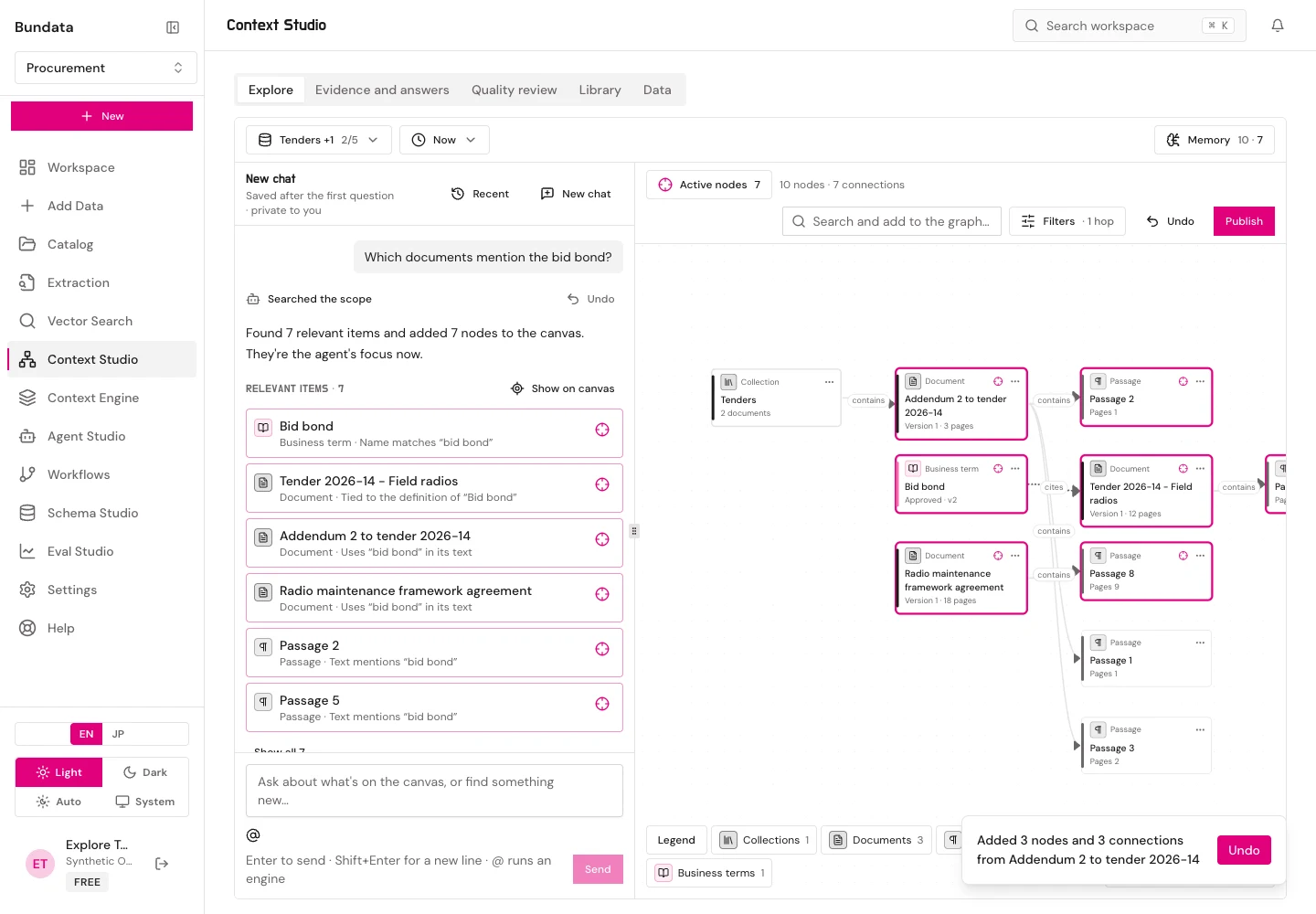
Explore is the default view of Context Studio (/platform/context-graph). A chat agent sits beside a live context-graph canvas. The agent finds items in your chosen collections and the business context library and places them on the canvas. Follow-up questions are answered from what is already on the canvas, and you can publish your curated focus into a context set.
Scope and time cursors
The top bar sets two boundaries that apply to both the chat and the canvas:
- Scope: 1 to 5 collections in the active workspace. Small workspaces (5 or fewer collections) start with all of them selected.
- Time cursors: True at (valid time when facts held in the world) and As known at (system time when Bundata had recorded the documents and graph facts). Changing the cursors re-reads the canvas from stored records without calling a model.
Meaning-based passage search runs only when your role includes agent:run. If a collection has no vectors or no connected embedding provider key, Explore searches that collection by keywords (Hebrew/English BM25) and displays a Keyword search only notice. If a collection has no graph built yet, a No graph yet notice links to its Knowledge tab.
Engine @-mentions and agent turns
Each message runs one bounded, tool-using turn. You can direct the turn with explicit @-mentions:
| Mention | Engine | Behavior |
|---|---|---|
@document | Whole-document query | Reads every part of the chosen documents and returns verified, cited spans |
@rules | Vetted rule template | Evaluates a vetted temporal-graph rule template and returns answers with proof trees |
@tables | Table facts | Reads typed table facts (tables-v3); falls back to passage search when no table values exist |
@history | Temporal comparison | Compares what changed between two valid times or two knowledge times |
@sql | Approved query template | Runs an approved read-only PostgreSQL query template with typed parameter values and shows rows as a table (refused while a past time cursor is set) |
Answers use the shared grounded-answer path with citations and abstention when evidence does not support a claim. How this was built lists every step with its tool, model, tokens, and duration.
Canvas controls and limits
- Node kinds: collection, document, passage, entity, fact, business term, verified answer, instruction, context set, theme, plus database table, view, column, dbt model, and query template.
- Interactions: Click a node to open details (sources, dates, version, connected nodes, Add to focus). Double-click to expand, collapse, or unfold a node (with an Undo toast). Right-click or press
Shift+F10to open the node menu (Open details, Expand, Add to / Remove from focus, Copy ID, Show sources, Show history, Remove from graph). - Bounds: The canvas holds up to 200 nodes and 320 connections; the focus holds up to 40 items; undo keeps 30 steps.
Publishing focus to a context set
Click Publish in the canvas header to turn focused items into context-set members:
- Library entries join as themselves; documents join directly; passages and facts join as their source documents.
- Collections in focus become a new draft set’s scope.
- Stewards of an existing set apply the change directly; editors submit it as a pending proposal with a reason.
Recent chats and privacy
Chats are saved privately per user along with their canvas (GET /api/w/:wsId/context-explore/chats). Only the user who created a chat can list, resume, rename, or delete it. Reopening a saved chat re-checks every cited source and withholds any node or message whose source is no longer readable. Workspace owners (explore:manage) set chat retention (7, 30, 90, 180, or 365 days; default 90) or turn saving off.