
The canvas is the graph on an open workflow. Adding a node saves the draft. It does not run it.
Workflow canvas
Open a workflow from the library. The Tasks tab is the canvas.
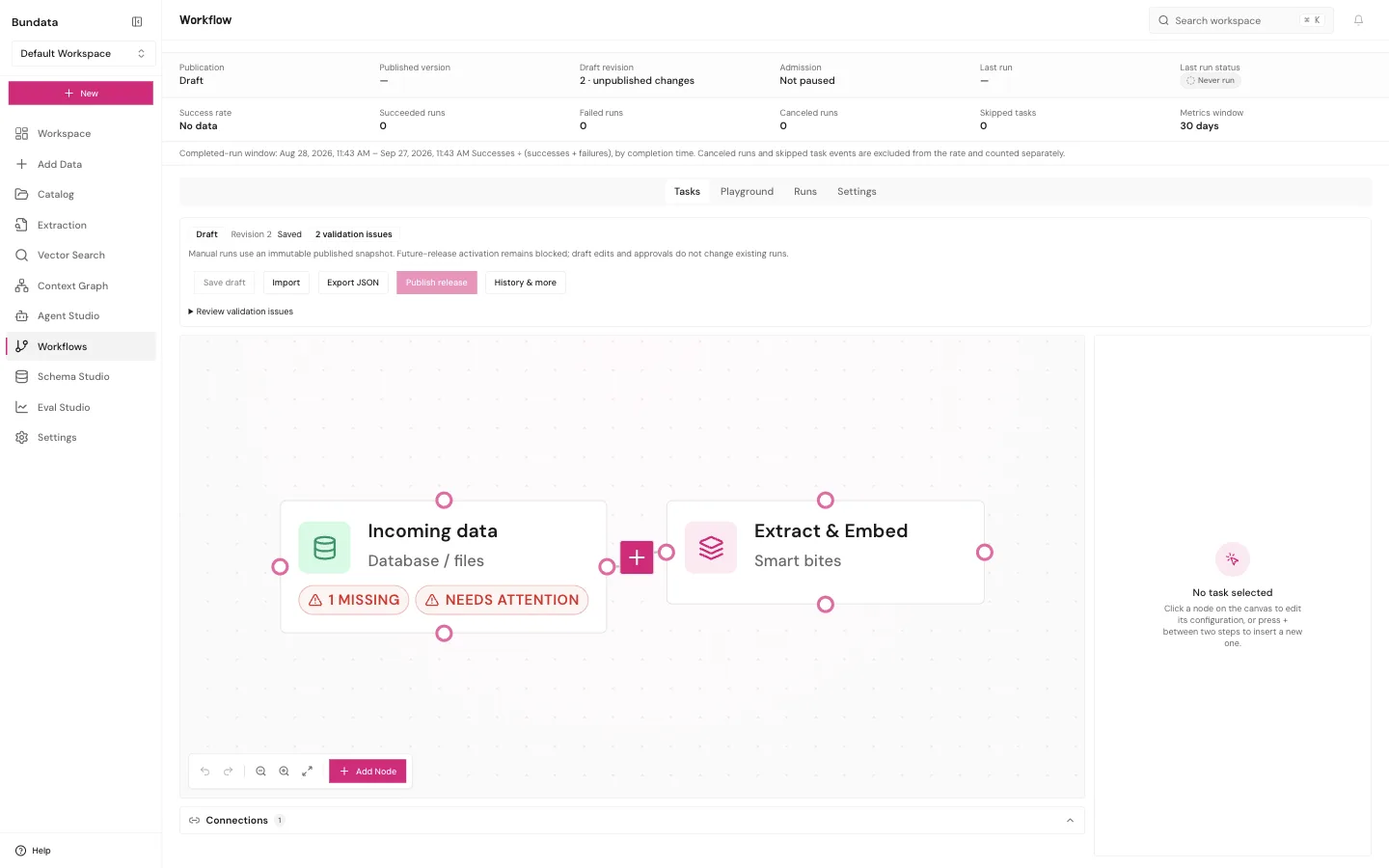
Open the graph
From Workflows, choose Open workflow. The header still shows Publication, Admission, and Last run. Those are the library facts. The canvas underneath is the draft graph.
Draft means unpublished changes. The screen says a manual run uses the immutable published snapshot. Editing the draft does not change a run that already happened, and it does not publish the new graph. Save draft stores the picture. Publish release is a separate button. Run now uses the published snapshot, not the unsaved draft.
If the graph is empty, the canvas says to add a node. Zoom, undo, redo, and fit sit on the toolbar. Undo and redo can be present and still disabled.
Add a node
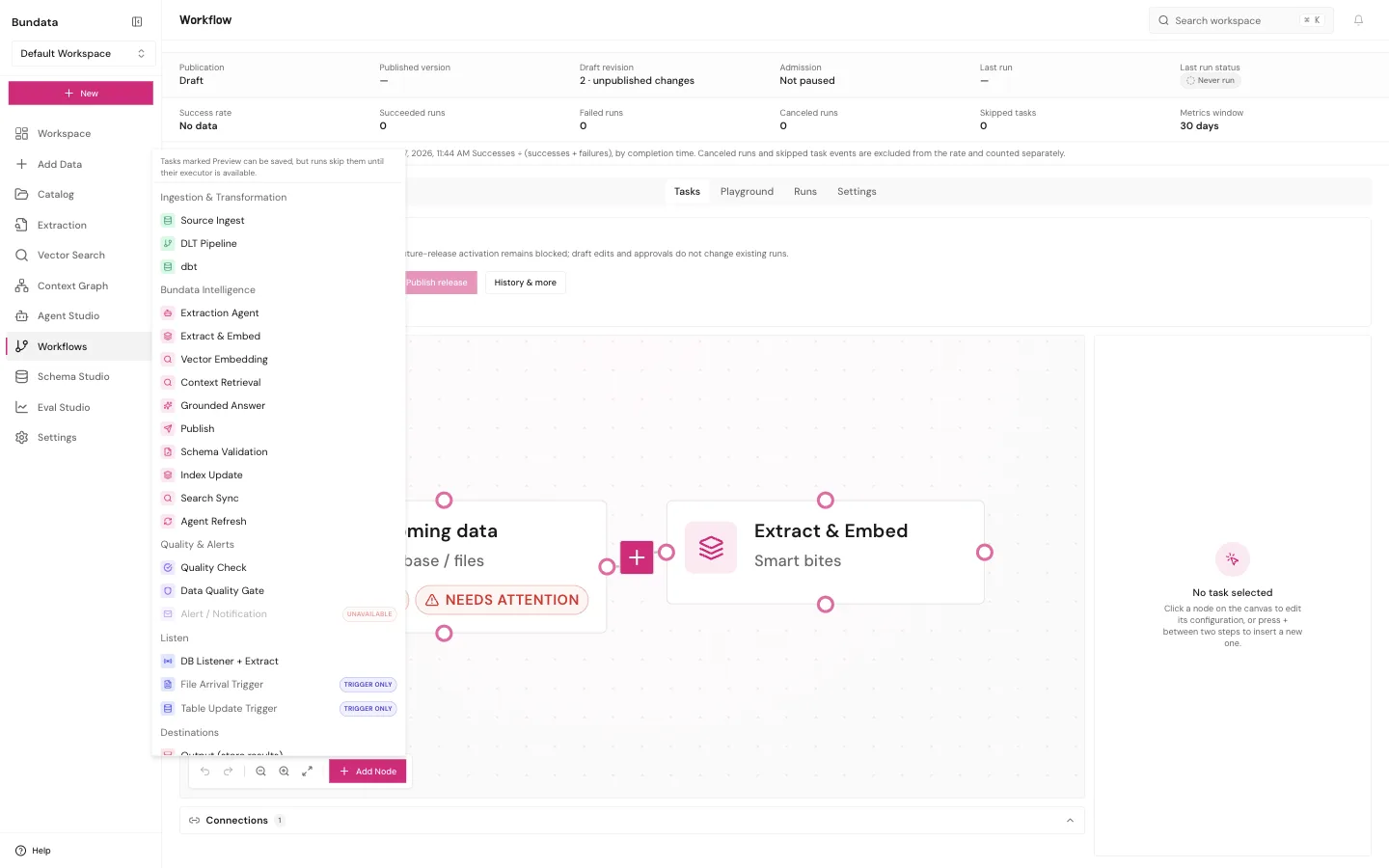
Add Node opens the catalog. You can also press the plus on a connection to insert a step between two nodes. The side panel says to click a node to edit it, or press plus between two steps.
The groups are:
| Group | What you can place |
|---|---|
| Listen | Table Update Trigger, DB Listener + Extract, File Arrival Trigger |
| Code / Compute | Notebook, Python Script, SQL Query |
| Ingestion and Transformation | Source Ingest, DLT Pipeline, dbt |
| Bundata Intelligence | Extraction Agent, Extract and Embed, Vector Embedding, Context Retrieval, Grounded Answer, Publish, Schema Validation, Index Update, Search Sync, Agent Refresh |
| Quality and Alerts | Quality Check, Data Quality Gate, Alert / Notification |
| Control | If / Else, splits, joins, For Each, Manual Approval |
| Destinations | Output (store results), Webhook, Slack, Email, and other delivery steps when the menu lists them |
A label on the row matters more than the fact that the row exists.
- Preview: you can save it. A run skips it until that step can run.
- Trigger only: it is a starting point, not a step you drop in the middle.
- Unavailable: it is listed, and it will not run.
Read the badge on the menu. Adding a node does not start a run. Webhook, Slack, email, ERP, and CRM rows are configuration. They have not delivered anything until a run shows that delivery.
Extraction
Index a collection continues from the Catalog index update template onto the canvas, with a collection bound. Generate Smart Bites feeds Index evidence. Catalog status Indexed is the result of a run, not a pink node on the draft.
You can also add Extract and Embed on a graph you build yourself, after a source step such as Incoming data. Its details include an opt-in Knowledge layers setting (knowledgeLayers: { version: 1, enabled, capUsd } from $0.01 to $10,000). When switched on, the workflow run builds section maps, table facts, graph extraction, entity resolution, and GraphRAG refresh for the documents that run brought in, stopping if recorded cost reaches capUsd.
RAG chat
RAG chat binds a collection, an answer schema, and a schema version, then opens the three-step canvas: retrieve, grounded answer, store. You can pick a specific model (OpenAI, Anthropic, or Google) on Grounded answer, Extraction agent (extractionModel), or Smart Bite generation (classificationModel and chunking strategy), or leave them on Workspace default. Model choices are checked during editing, at publication (WORKFLOW_RELEASE_VALIDATION_FAILED), and at run admission (409 WORKFLOW_MODEL_UNAVAILABLE), and are pinned in the published release.
Analysis
Summarize a collection is the short cited summary. The longer comparison, which needs two to eight documents and human review, is on that same page.
Python and SQL
Python and SQL saves Python compute onto the canvas. That template has no collection picker. SQL query (read-only) is one read-only SELECT against a registered PostgreSQL source.
What does not run by itself
Save draft, a new node, and Create workflow on a template card all store configuration. Publish release makes a snapshot. Run now executes that snapshot when your role includes workflow:run and workers are available. Last run status on the library is the record. A canvas with no validation issues is still not a succeeded run.